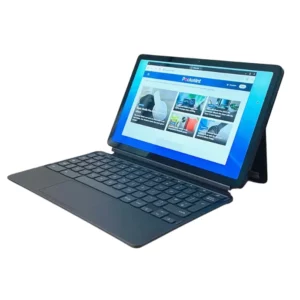
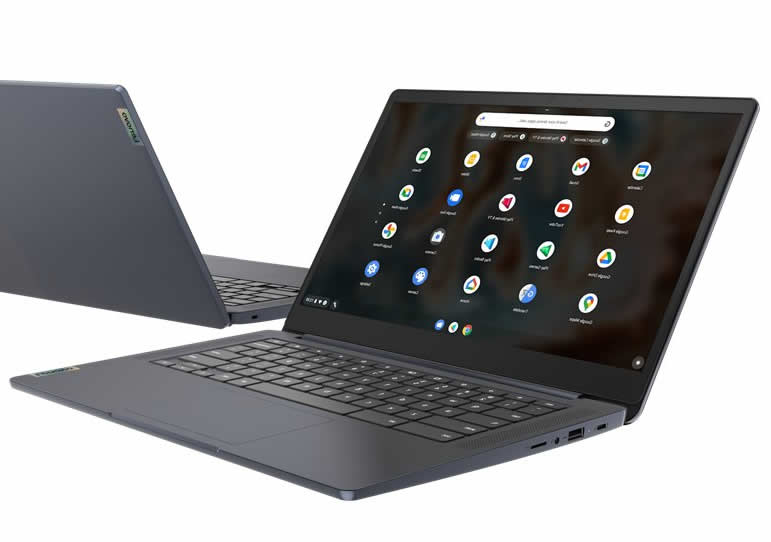
Lenovo Chromebook is a lightweight and robust laptop and with a 29.46 cm (11.6″) screen, the Chromebook is the perfect device for students and teachers.
Designed to withstand daily classroom wear and tear, it also has the speed, simplicity, and security of Chrome OS. This little wonder takes just eight seconds to light up, less time than most students need to open the book.
Functions: trust your teachers
Chromebooks are becoming more common in the education space: more than 10,000 schools use them and more than 50 million students and teachers use Google Apps for education. They are the best device in early childhood, primary and secondary education in the United States in 2014, 2015 and 2016. And the Chromebook N23 shows why: It’s easy to use, share and manage. Multiple students can share one device, but each student retains their personal experience.
Reliable and hardworking like students
The Intel ® Celeron ® N23 dual-core processor works seamlessly with Chrome OS, G Suite for Education, and Google Play Store applications, which are the underlying elements of the collaborative educational experience associated with the Chromebook. It’s easy to create, share, and collaborate with G Suite apps like documents, templates, and presentations, and stay in sync across multiple devices. The students pThey can access data, photos and applications in the cloud at any time and from any place and device.
Optional: there are options with a multi-touch screen and supports the touch of up to 10 fingers, which increases interaction and boosts productivity. Plus, glareproofed technology reduces eye fatigue, so students can use this Chromebook for longer.
Easy to carry and resistant to drops
The Chromebook N23 is designed for the education sector and is rugged enough to handle the rigors of the school day. Its 180-degree rotating ports and hinges are reinforced; The screen is sealed and the water-resistant keyboard has wear-resistant keys. Its non-slip texture hides friction and scratches, improving grip on the student’s part. Even in the event of an accident, the N23 is resistant to falls: it was designed to withstand blows or falls from a distance of 70 cm (Interestingly, this height is equivalent to that of a school desk).
Google Play means applications for Galore
The Chromebook N23 includes access to the Google Play Store and G Suite for Education, allowing you to purchase, download and manage Android applications, choose from thousands of educational applications, such as School loop or Khan Academy, and much more. You will be able to access all your APL
Includes rotating webcam captures more than most
The Chromebook N23 incorporates a 720p webcamwhich can rotate 180 degrees. Thanks to its unique design, it allows you to interact with those around you, take photos and record videos. Plus, it’s perfect for chatting online.
More comfortable to carry than many textbooks
Leave the power cord at home. Backpacks, textbooks, notepads, pencils and other items: there are many materials that students have to use in their daily lives. So adding a power cord to that list would be too much. Thanks to its 10-hour autonomy, the Chromebook N23’s battery lasts a full day of work and much more. Take your device home, charge it all night and forget about using cables the next day.
With a weight of 1.35 kg and an integrated, retractable carrying handle, the N23 is easy to carry even for younger students.
Top 7 best apps for Chromebook:
At the moment, we can only enjoy those applications that are in the official Google Chrome app store, but not the Android APK. By power, technically you can, but it’s not available to everyone. It is estimated that it will soon be able to do so from the factory. Below we indicate some:
VLC Media Player
It may not be the best known or best, but it is one of the most supported formats. And why not say it, the best known for Windows and MacOS, as well as Linux, of course, as free software(which is why it is available for so many operating systems and why it is compatible with so many video formats, even suitable for receiving streaming video).
Microsoft Office
Chromebooks come standard with Google’s Office suite (documents and templates, among others), but beyond that it is not completely complete, we may not be very used to it or may not like it.
It’s not like the Microsoft Office we’re used to using, because it’s a Web version, but it’s ideal for this type of computer (among other things due to RAM consumption).
Telegram
Telegram, although statistically it has half as many users as its main rival (WHATSAPP, clearly), but it remains one of the best alternatives in terms of instant messaging applications.
Pixlr
PIXLR is one of the best free image editors (but not just on Chromebooks, but also on Windows and any other operating system). It has a version for Chrome, which is really nothing more than a link to its own website where you can find image editing software. Of course it’s not as powerful as Photoshop, but it can get us out of very big problems, and the best of all is that it’s free. Thanks to the webapp for Chrome, we will be able to enjoy this fantastic application on our new Chromebook.
Spotify
Data Saver
How to save data in Chrome and Firefox with Google Compressor
Do you use a SIM card to browse with your Chromebook? The best thing is to use this extension designed directly by Google to save data consumption. Personally, I have even experienced savings of 50%, which is very substantial. It’s like we have almost twice as many gigabytes to browse for free.
Caret
No computer can lack a code editor! A Chromebook is not for less, so it is (almost) mandatory to install Caret or any other code editor, which are very good. In particular, it adapts to the language we are dealing with at any given time, and it works online and offline.
With these 7 applications we are sure to make the Chromebook a more useful system, because although it is very good, it needs a lot more community to be able to become what Windows or MacOS already is.
































3 reviews for Lenovo Chromebook 15″
There are no reviews yet.